Announcing Expand Fetch
Your agent has an IQ of 200. It can solve the hardest math problems, but fails at answering basic questions about the web.
It's missing reading glasses. Today we're announcing Expand Fetch, and you can use it right now.
Agents are confidently wrong
Markdown APIs drop icons, break tables, and miss hidden JSON. So your agent answers incorrectly, with confidence. And you can't tell whether the page failed to load or the conversion dropped something.
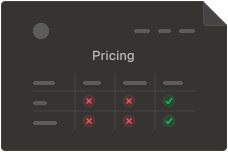
Ask an agent which plan on a pricing page has uptime SLAs. The page marks Business with a ✗ and Enterprise with a ✓. Markdown that drops the icons hands the agent two plans that both list "Uptime SLA", and it answers: both. Keep the icons, and it answers: only Enterprise.
What we're shipping
We started out building research agents, and we got tired of watching them misread the pages they were sent to read. We set out to make the web queryable like a database. But before we can structure the web, agents need to be able to see it.
Expand Fetch is our first step toward lossless, verifiable web data.
It brings together two models we trained, Iris and X-Ray, with the Wayback Machine and Highlights in one API. Send a URL and get accurate Markdown, useful hidden JSON, and a snapshot you can cite. Both models run on every fetch, on the page as a real browser loads it, with JavaScript rendering, residential proxies and bot protection handled for you. It's still a fast API call. Crawl runs Fetch across entire sites, while WebSync tracks changes over time.
Built on Fetch
You can use it today:
Engineers at OpenAI and Amazon Science already use it, and teams who care about quality run it in production today. Some of them switched from legacy scraping providers that no longer gave them the value they should get.
Iris
The part we're most excited about is Iris: Jev for the web. We built it from scratch, the architecture, the training data and the way we train it, and it's so efficient that it processes about 500k tokens per second. It took us a year of sweat and tears to make it happen.
TypeSafe reported that data was the most important part of training Jev. We found the same with Iris: building a high-quality dataset was hard work.
Turning websites into Markdown sounds straightforward. So why did we spend a year building a model to do it?
Why Markdown benchmarks are broken
We looked at existing Markdown benchmarks and found that they assume a page has one main content area, like Firefox's reader mode (powered by Readability.js), and measure how well a converter extracts it.
That works for a page with one main article, but breaks down on more complex layouts. The web is the Wild West: there's no single layout to rely on.
We tried building a Markdown converter with heuristics and came away convinced they can't handle the full web. It's whack-a-mole. A rule that drops a footer can delete a company's address on one page and leave 100,000+ tokens of trash on the next.
Preserve, prune, appendix
That's why we see the problem differently. Iris sorts every DOM element into one of three categories: preserve, prune and appendix.
Expand Fetch is designed for research agents. When deciding what information to keep, we ask a simple question: Could this information help answer a useful question? If yes, it stays.
Preserve keeps an element in the main Markdown. Prune removes clutter like ads, UI chrome, and social sharing buttons. Appendix moves information that might be useful out of the main Markdown without discarding it.
This is progressive disclosure: we can't know in advance what an agent will need, but we can choose sensible defaults for what to keep.
On a pricing page, Iris preserves the pricing table as Markdown, moves the navigation and footer to the appendix, and removes promotional and cookie banners.
Iris doesn't rely on HTML alone. It sees the page as it's rendered, just like you do, a bit like a vector graphic: every element with its position, its size and its weight. That lets it keep the column a price sits in, preserve pricing tables, render an "included" icon as a check mark, and recognize navigation sidebars instead of treating them as main content.
We compared the latest version of Iris with Jev on the same validation set, measuring how accurately each sorts page elements into preserve, prune, and appendix.
Iris on the validation set
How well each model sorts a page into preserve, prune and appendix.
| Metric | Iris | Jev |
|---|---|---|
| Average precision | 93.93% | 75.72% |
| Average recall | 91.66% | 66.52% |
| Average F1 | 92.72% | 69.55% |
Iris and Jev on the same validation pages. Higher is better.
MDBench v1
Ultimately, what matters is whether agents can answer questions correctly using the Markdown they receive.
That's why we built MDBench with our customers: a benchmark covering 1,094 questions across 326 challenging web pages. We intentionally target cases where existing systems struggle, so we have a clear roadmap for what to improve.
We're keeping the benchmark private for now.
MDBench Hard
v1Hard Markdown extraction benchmark
| API | Questions answered correctly | 95% confidence interval |
|---|---|---|
| Expand | 74.1% | 70.4% to 77.6% |
| Exa | 55.3% | 50.9% to 60.1% |
| Firecrawl | 27.2% | 24.2% to 30.5% |
Claude Sonnet 5.5 answers using each API's Markdown at default settings; answers are graded strictly.
X-Ray
Not everything a page shows is in its HTML. A product's price, rating and whether it's in stock, map coordinates, flight gates, and diagram data often live in JSON loaded by the page, which traditional Markdown converters miss.
X-Ray is our second System One model. It reads the JSON a page loads and keeps information that might help answer a question, filtering out analytics, configuration, and rendering state. The useful data comes back alongside the Markdown in the same API call.
Linear's pricing page contains 17,374 tokens of hidden JSON, including customer stories. X-Ray identifies the relevant information, like the fact that Commure has logged over 80,000 requests across thousands of healthcare customers.
Expand is the only provider we tested that includes the hidden JSON from the page.
Wayback Machine
When an agent gets an answer wrong, the first question is what it actually saw. But websites change, and without a record of the original page, it's hard to know what went wrong.
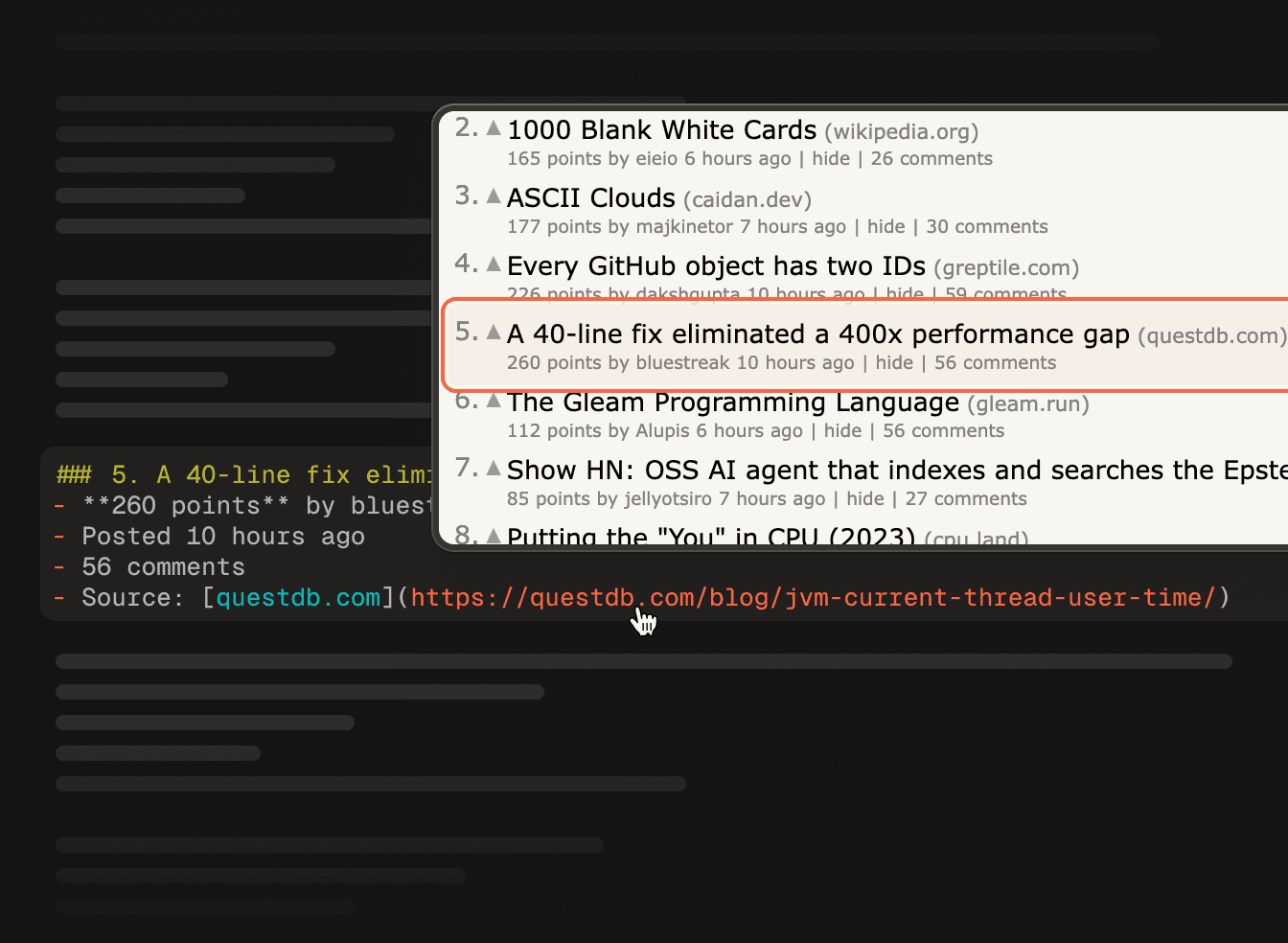
Every fetch is saved as a full snapshot of the page, including its assets. It's a browsing history for your agent, and a snapshot you own. Every line of Markdown links back to where it came from, even if the site changes. Hover to inspect the source, or share a link as a citation. Here's one we fetched.
Highlights
If your agent already knows what it's looking for, it doesn't need the whole page. Pass a query with the fetch, and Highlights returns only the passages that answer it:
const page = await expand.fetchJson({
  url: "https://docs.stripe.com/webhooks",
  highlights: { query: "How do I verify signatures?" },
})

// The passages that answer it, ranked, instead of the whole page
if ("data" in page) console.log(page.data?.highlights?.snippets)
Try it on the same page. Ask it something, or pick one of the questions:
Stripe's webhooks guide as Expand captured it, with the playground's Highlights. Ask it a question and the passages that answer it are framed, a few hundred of the page's 6,800 tokens.
Highlights reads the whole page and returns only the passages relevant to your query. That saves over 95% of tokens without sacrificing accuracy, and gets your agent to its first token faster.
Beyond one page
Fetch handles individual pages. Crawl and WebSync extend it to entire sites.
Crawl
Crawl runs Expand Fetch across an entire site. Each page returns Markdown from Iris, hidden JSON from X-Ray, and a Wayback Machine snapshot. It scales to millions of pages without requiring you to manage crawling state or processes. Each page costs one credit, the same as an individual fetch.
WebSync
Crawls that never stop. Subscribe to a site, and WebSync streams changes to your file system or database as we detect them: pages added, changed, or removed. Subscribe to the web.
Try it today
We believe Expand Fetch is a big step toward making the web accessible to agents.
You can try it today for $1 per 1,000 fetches, with volume discounts for enterprises. The quickstart gets your first fetch running in a few minutes, or you can let your coding agent set itself up:
This is just the first step. Want to query the web like a database? Join the waitlist:
Query the web like a database
Structured data from any site, as rows you can query. We'll email you when it opens.
About Expand
Expand is an applied research lab. We build the models that let agents read the web, and we build them from scratch: Iris's architecture, its training data and the way we train it are our own.



It's time to expand your agent's vision.
